
In short — as of August 2026: AIMA runs two things you'll actually use online — a process tracker and the Portal das Renovações (renewal portal). To check where your file sits, go to AIMA's contact form at contactenos.aima.gov.pt, choose "Consulta e acompanhamento do processo" then "Qual o estado do meu processo?", and verify the email on your case; since July 2026 this returns a step-by-step status. To renew an expiring or recently expired permit, log in at portal-renovacoes.aima.gov.pt, complete the form, upload documents and pay online — no appointment for most cases, though AIMA may still call you in for biometrics. The one thing that breaks both is an out-of-date email, so fix that first. Processing runs roughly three to six months for a complete file.
Dealing with AIMA — the Agency for Integration, Migration and Asylum that replaced SEF in 2023 — used to mean queuing for a phone line that never answered. In 2026 most of it moved online, and two tools matter: a process tracker that tells you where your application actually is, and the Portal das Renovações for renewing a residence permit without an in-person appointment. This guide walks through both, click by click, and explains the status messages you'll see along the way.
If you're at an earlier stage — still trying to get a first appointment — start with our guide to booking an AIMA appointment. If you specifically want the renewal rules, documents and deadlines rather than the portal mechanics, our residence permit renewal guide covers those in full. This page is the hands-on "where do I click" companion to both.
First, Fix the One Thing That Breaks Everything: Your Email
Before you touch either portal, make sure AIMA has your current email address. Both the process tracker and the renewal portal identify you and send every notification through the email linked to your case. An old or mistyped address is the single most common reason people can't find their process, miss a document request, or never hear back.
To check or update it, open AIMA's contact form at contactenos.aima.gov.pt and submit a request to confirm and update the email on your file. Do this even if you think it's correct — a five-minute check now saves months of silence later.
Part 1 — How to Track Your AIMA Process
Since July 2026, AIMA's contact form includes a genuine step-by-step tracker rather than the old black box. Here is how to use it.
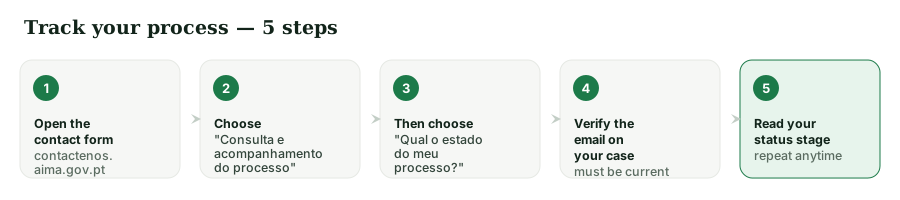
Step 1 — Open the contact form. Go to contactenos.aima.gov.pt. This is the same portal you used to update your email.
Step 2 — Choose the tracking route. From the subject options, select "Consulta e acompanhamento do processo" ("Consult and follow up on the process").
Step 3 — Ask for your status. Then choose "Qual o estado do meu processo?" ("What is the status of my process?").
Step 4 — Verify your email. Enter and verify the email address linked to your case. If it matches what AIMA holds, the system returns your current stage. If it doesn't, go back and update your email first (see above) — the lookup keys entirely off this.
Step 5 — Read the stage. You'll see where your file sits in the pipeline. Note the stage and the date; you can repeat this check whenever you want an update.
What the Status Stages Mean
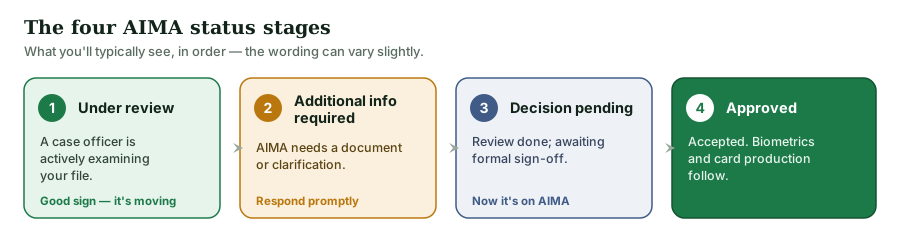
The wording can vary, but the typical pipeline runs in this order:
- Under review — a case officer has been assigned and is actively examining your file, checking documents and verifying details. This is a good sign: your case has left the general queue and is being worked.
- Additional information required — AIMA needs something more: an updated document, extra evidence, or a clarification. Respond promptly, through the channel AIMA specifies, or the clock effectively stops.
- Decision pending — the review is complete and your file is waiting for a formal decision by the authorised officer. Nothing is required from you here except patience.
- Approved — your application has been accepted. The next step is usually biometric collection and card production; AIMA will contact you about the appointment and the card.
If you sit at "additional information required" for a while, that delay is usually within your control to fix — it means the ball is in your court. "Decision pending" means it's genuinely with AIMA.
Part 2 — How to Renew on the Portal das Renovações
The Portal das Renovações (renewal portal) lets most people renew an expiring — or recently expired — residence permit entirely online. It's being switched on in phases by permit expiry month, so the first thing to confirm is that your month is currently open.
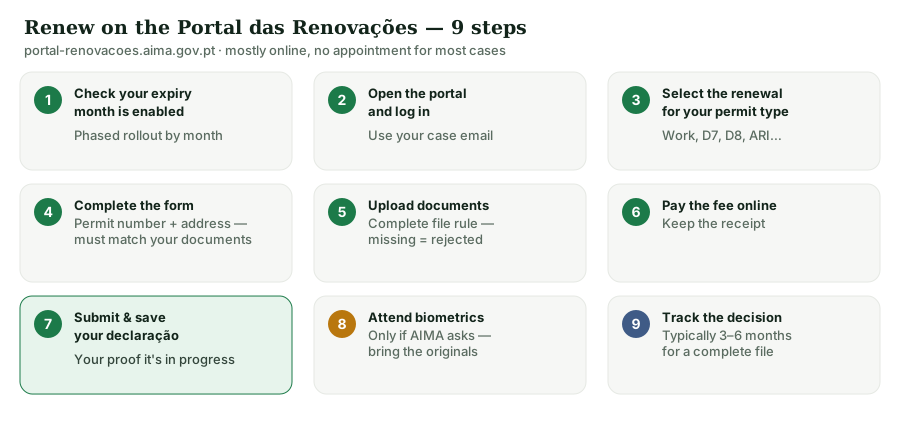
Step 1 — Check your expiry month is enabled, then open the portal. Go to portal-renovacoes.aima.gov.pt. The portal covers permits expiring from July 2025 onward and has been progressively opened to already-expired permits. If your expiry month isn't live yet, you'll be told — check back rather than assuming something is broken.
Step 2 — Log in. Sign in with the credentials the portal requests (typically tied to your NIF / registered identity and the email on your case). Use the same email AIMA holds for you.
Step 3 — Select the renewal for your permit type. Choose the renewal option that matches your permit (work, D7, D8, family reunification, student, ARI/Golden Visa, and so on). The types of Portuguese residence permit are explained separately if you're unsure which you hold.
Step 4 — Complete the form. Fill in your personal details, your current permit number, and your address in Portugal. Accuracy matters — a mismatch between what you type and what's on your documents is a common cause of delays.
Step 5 — Upload your documents. Attach the required documents as clear, legible scans or photos. Exactly what's needed depends on your permit type; our renewal guide lists them. Since April 2025 AIMA applies a strict complete-file rule, so upload everything before you submit rather than hoping to add it later.
Step 6 — Pay the fee online, and mind the 10-day DUC clock. The portal generates a DUC (Documento Único de Cobrança) — your single payment reference — and you have 10 working days to pay it before it expires (AIMA states this in its official FAQ; see our renewal facts). The reference can take roughly 24–48 hours to go live before your bank accepts it, so pay early rather than on the last day. Keep the receipt. If a DUC does lapse unpaid, you generally have to request a new DUC and pay that — you don't lose the renewal, but you lose time.
Step 7 — Submit and save your proof. Submit the request and download the confirmation (comprovativo/declaração) immediately. This is your evidence that a valid renewal is in progress — keep it with your expired card and any legal-stay/QR proof.
Step 8 — Watch for a biometrics call. If AIMA needs your fingerprints and photo, it will notify you via the portal or email to book a short in-person appointment. Bring the originals of everything you uploaded on the day.
Step 9 — Track it. From here, use the process tracker above to follow the decision. A complete online file typically clears in three to six months, and clean submissions that never trigger a document request move fastest.
Can I Upload Documents Whenever I Want After Submitting?
A question we're asked constantly: once the file is in, can you keep adding documents unprompted, or only when AIMA asks? Treat the document stage as notification-driven. After you pay, AIMA notifies you which documents to upload and gives a window — generally 10 working days — to provide them through the channel it specifies. Don't assume the portal stays open indefinitely for you to drip-feed extra papers on your own initiative; upload what's asked, when it's asked.
This matters because of how the law treats a gap. Under the Código do Procedimento Administrativo, Article 119.º(3), if documents that are genuinely necessary to assess your request aren't provided, AIMA "does not carry the procedure forward" and notifies you — your file pauses rather than being refused. And under Article 132.º, a case is only formally declared deserted after more than six months of applicant-caused inaction, and even then "desertion does not extinguish the right" you were exercising. Reassuring, but not a reason to miss a window: a stalled file can still leave you without valid status near expiry.
While You Wait: Are You Still Legal?
Yes — a common worry with no need for panic. Portugal has repeatedly extended the validity of expired residence permits and issued legal-stay declarations so that people mid-renewal remain regular, including for travel and daily life. Keep your renewal confirmation and any government-issued legal-stay or QR proof to hand. Our renewal guide tracks the current legal-stay position in detail, since the extension dates have moved several times.
Troubleshooting the AIMA Portals
- "The portal can't find my process" / no notifications. Almost always an out-of-date email. Update it via contactenos.aima.gov.pt and try again.
- "My expiry month isn't available." The renewal portal is phased — your month may not be switched on yet. Check back; it isn't an error with your permit.
- A document keeps getting rejected. Re-upload a clearer scan (good lighting, all four corners, no glare), and make sure names and numbers match your other documents exactly.
- Stuck at "additional information required." The ball is in your court — supply exactly what's asked, promptly, through the channel AIMA specifies.
- Nothing moves for months at "decision pending." This one is genuinely on AIMA. If your existing permit is close to lapsing, keep your legal-stay proof current and consider professional help.
When to Get Help
Most renewals are manageable alone if your file is complete and your email is current. It's worth getting help when your case is complex — a lapsed permit with a broken residence period, a family reunification file, an ARI/Golden Visa renewal, or a request for information you don't understand. A mistake at submission can cost months, and since April 2025 an incomplete file is rejected rather than corrected.
Frequently Asked Questions
For most cases, no — the Portal das Renovações handles it online. AIMA may still call you in for biometrics.
The one linked to your case. If unsure, update it via the contact form first; both portals depend on it.
The tracker follows an existing process by the email on file. If you don't yet have a process, see our appointment guide for getting started.
Yes, through the portal — it generates a DUC payment reference you pay within 10 working days. Keep the receipt and the submission confirmation.
No — the document stage is notification-driven. Upload what AIMA requests, when it requests it, inside the window given (generally 10 working days after payment). If you miss it, Article 119.º(3) of the CPA means your file simply isn't carried forward until you provide the documents, rather than being refused.
Usually still fine to renew online once your month is enabled, and legal-stay measures keep you regular meanwhile. Confirm your month on the portal and keep your proof.
Getting through AIMA in 2026 is mostly about two habits: keep the email on your file current, and submit a complete package the first time. Do those, track the stages calmly, and most renewals resolve without drama. For the wider journey — from first permit to permanent residency — our visas & residency pillar maps every step.
Facing a complex renewal or a confusing status message? Talk to our team and we'll handle the AIMA process with you, remotely.